
Frequently Asked Questions
Accounts
-
How do I change my email address?
How do I change my AISTATS login email address?
Use the feedback form under the help menu to send a request to change your email address. Please include the both the existing email address and the new address.
-
I already created an account, but the system says I do not have an account.
I already created an account, but the system says I do not have an account.
AISTATS and CMT are independent websites with separate user accounts. We request you use the same email address for each because it makes it easier for us to link accepted papers to AISTATS accounts.
-
I have two different virtual.AISTATS.org accounts, can you merge them?
I have two different AISTATS accounts,
Can you merge them?
Each virtual.AISTATS.org has only one email address. Many people have multiple email addresses and as a result the can end up with multiple virtual.AISTATS.org accounts.
A common situation is that you submitted a paper on OpenReview/CMT with an email that is different than your virtual.AISTATS.org account email. When we import accepted papers we create accounts for authors who do not have an account with the email that they used on OpenReview/CMT. virtual.AISTATS.org, CMT and OpenReview are all separate systems so the only way we have of linking accounts between them is by email address
We recommend that you merge your accounts so that all you registrations and papers are in a single account. To merge your accounts visit the MergeAccounts page.
-
I've forgotten my virtual.AISTATS.org password. How do I login?
I've forgotten my AISTATS password. How do I login?
Note that the paper submission site CMT and AISTATS are not linked. You may have different usernames and passwords on CMT than on AISTATS.
Reset AISTATS Password
Credit Card Payments
-
How is my credit card information protected?
How is my credit card information protected?
Your information is protected by TLS encryption between your browser and the card processor. AISTATS never knows or handles your credit card number.
-
I should have received a refund by now, but it's not on my credit card activity. Where is my refund?
I should have received a refund by now, but it's not on my credit card activity. Where is my refund?
Thanks to the workings of the credit card networks, refunds can take two weeks to process. If you still haven't received a refund after 3-4 weeks, please contact us at Contact Us and we will will trace your slow or missing refund. Mention AISTATS in the subject line.
-
Why was my credit card payment declined?
Why was my credit card payment declined?
If a payment was declined, you wil see
 . Click to reveal the reason for the decline.
If the website does not tell you the problem, there is regrettably little we can do to help. For security reasons, banks will not answer questions from anyone other than the account holder. If you cannot get the payment to go through, we recommend either you contact your issuing bank, or use a different card.
We only accept Amex, MasterCard, Visa.
If you are using an institutional or government credit card you may need to contact the responsible department to pre-authorize your charge. In previous years some registrants have run into problems with cards that are restricted to a very limited set of merchants or require advance notice on transactions over a certain amount.
Exhibitors FAQ
-
Exhibitor FAQ’s
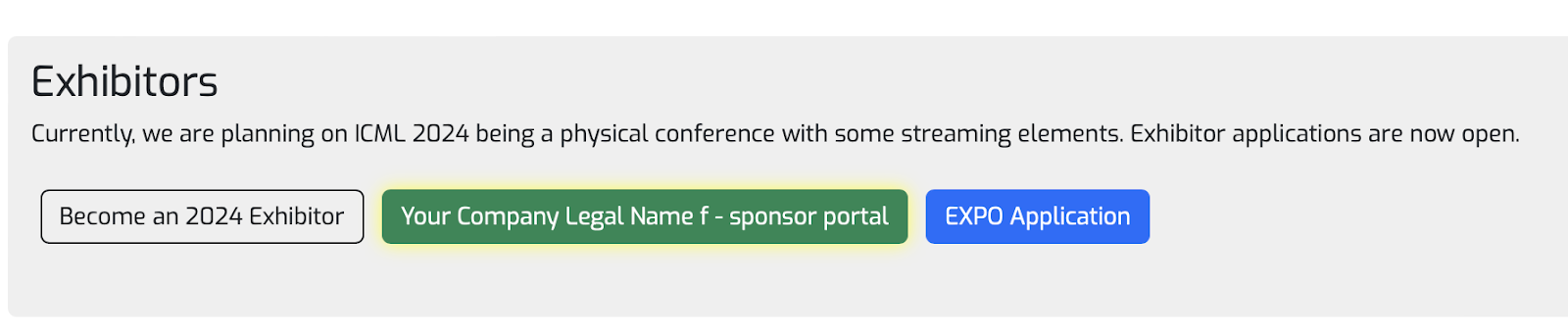
Q: How do I access the Exhibitor Portal?
A: Please click on the Green button with your company name. See image below:
Q: How do I get an invoice for payment?
A: Click on “Send Invoice” in the exhibitor portal. Verify the information, including the PO number is correct (if applicable). Then click the button to email to yourself. If your company requires the invoice to come from the conference, please notify us immediately.
Q: What happens if the invoice information is incorrect?
A: The invoice is auto-generated from the information you’ve entered in the “your information” section of the application. If you need name changes, a PO number added, etc., please update your information section, refresh the page, click on the “Send Invoice” tab, and send to yourself.
Q: How can other members of my team gain access to the exhibitor portal?
A: They must create a profile on the website first. Then you can add them to the exhibitor badge section, click save. They will notice the same green tab on their homepage that is shown on the first Q/A on this sheet.
Q: How do I get access to the attendee list?
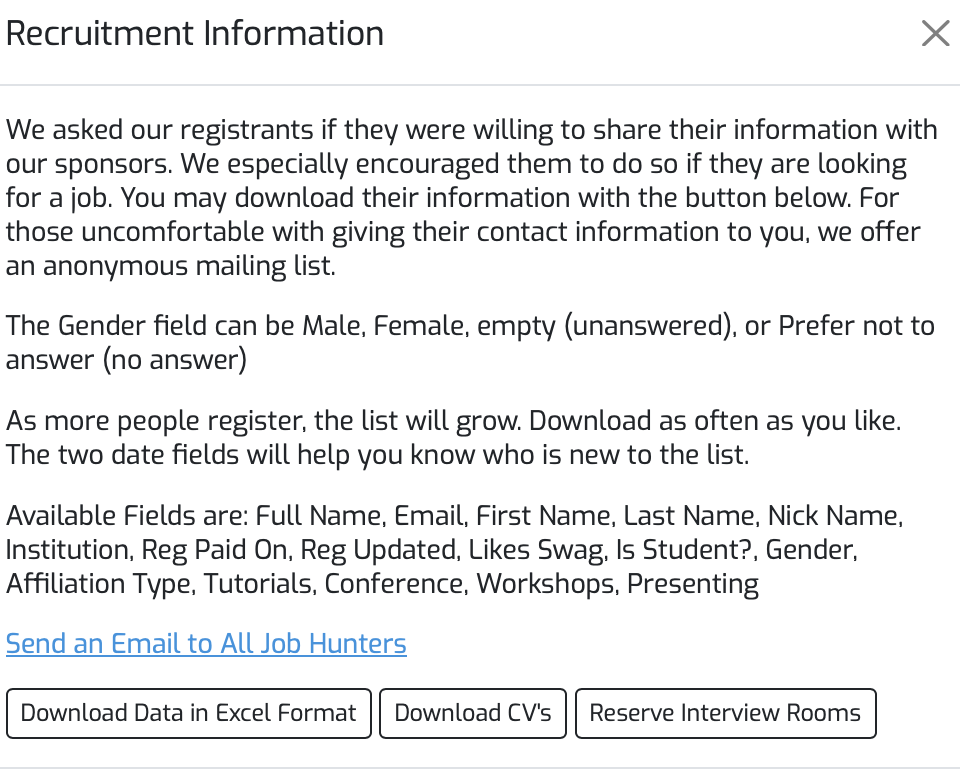
A: You will not have access to the Opt-In attendee list until we have received a signed contract and payment from your company. Once we have these items, you will see a BLUE “Recruitment Information” tab in the exhibitor portal. Once you click that, a window pops up where you can download an Excel sheet and a Zip folder of CV’s for your recruitment efforts. See image below
Q: Does the conference have a lead scanning system?
A: Yes! This is built into the exhibitor portal and you will have access once the signed contract is submitted and we have received payment. Until then, please review our Wiki page with specific instructions on how it works. No app or scanning device required.
Q: Who gets access to lead scanning?
A: Only the team members who have been entered into the exhibitor badge section of the portal will have access. If someone from your team needs a full conference registration but also wants access to lead scanning then you may add them to both sections.
Q: What if my company needs additional exhibitor badges or full conference registrations?
A: The conference does not sell additional exhibitor badges. Your company will need to purchase any type of registration (usually the cheapest) to gain access to the exhibit hall. If your company needs additional full conference registrations then those will need to be purchased at the company’s expense.
Q: How come my logo won’t upload in the portal?
A: The only file accepted is an svg file. Be sure you are using the correct format. If the file you are uploading isn’t an svg file, please work with your team to create one.
Q: Is the Certificate of Insurance (COI) required?
A: Yes! Even if you have an exhibitor appointed contractor (EAC). The COI we are asking for is liability insurance for your employees who will be working the booth at the conference venue, which is not the same as the COI for an EAC. Be sure to upload before the deadline.
Q: Can my company get a breakdown of attendee demographics?
A: The conference has strict privacy policies, so we do not share that information with exhibitors.
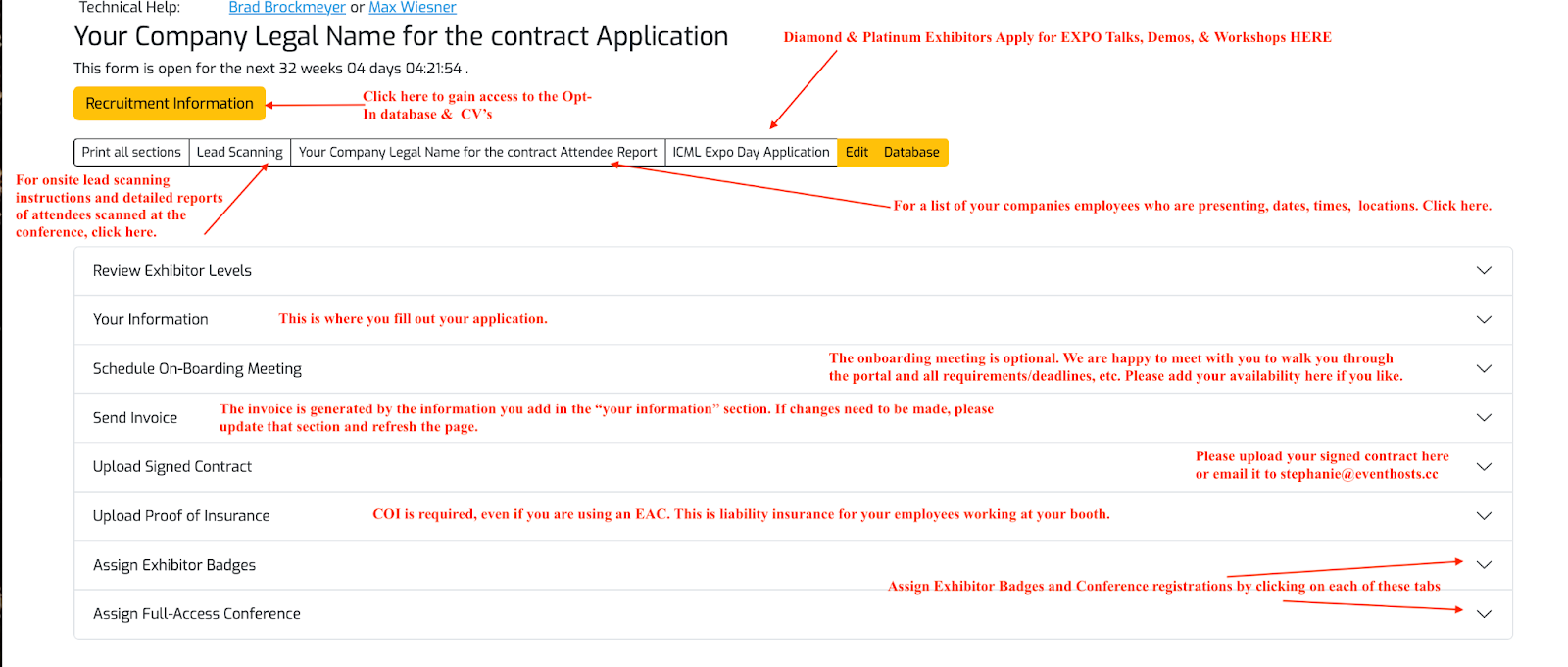
Q: How do I fill out the exhibitor application with the correct information?
A: Please see the image below with helpful tips.
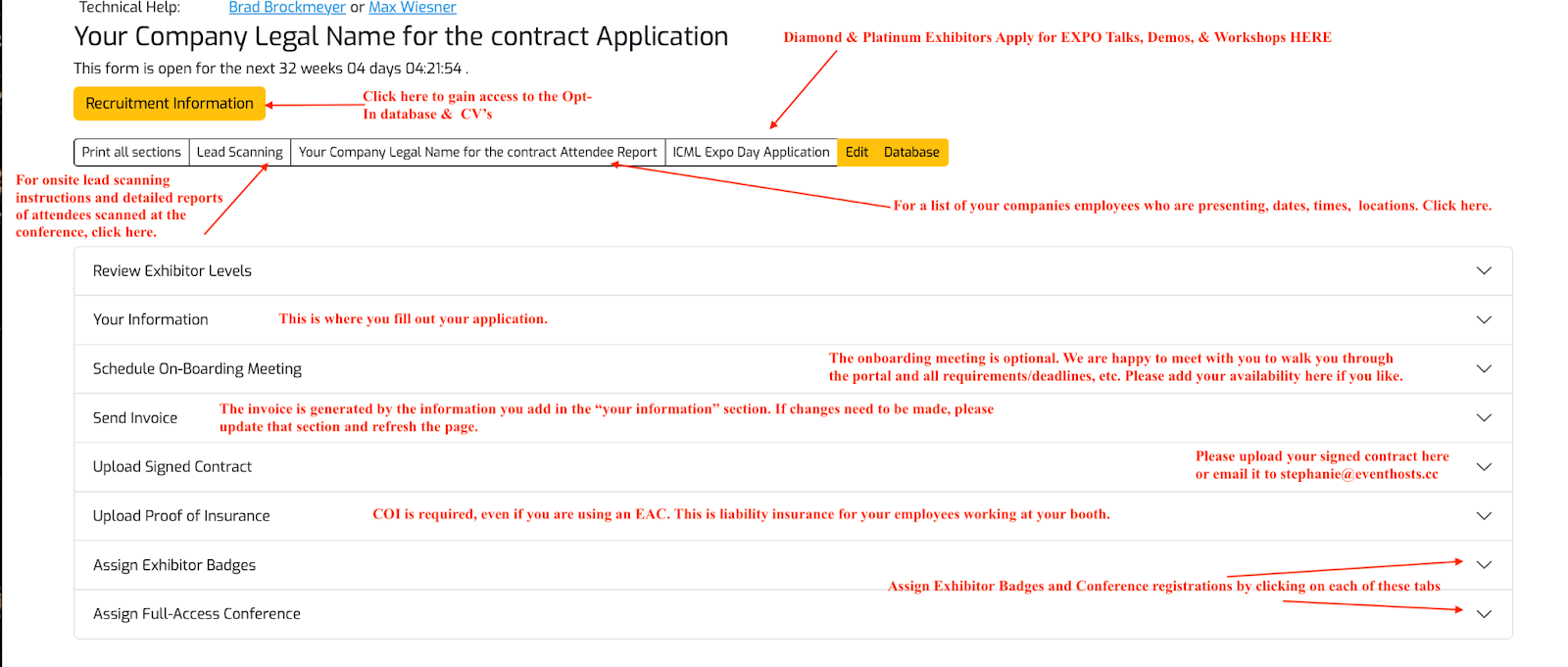
Please see the image below that you may also find helpful in navigating the exhibitor portal.
Onsite At the Conference
-
Badge Replacement Policy
Badge Replacement Policy
Treat your Badge like cash. You will not be allowed into the Conference without a badge
Badge Replacement Policy
- 1st Time: Badge Replacement Fee
- $60 USD or the equivalent in the local currency
- Cash only.
- Exact change only
- A refund is available if within 24 hours you return to the registration desk with both both badges
- 2nd Time: Badge Replacement Fee
- You will need to purchase a new registration for the current and remaining conference sessions
- No Refund
Damaged Badges
- We will replace damaged badges for free that are damaged, scuffed, or need to be updated due to change of institution.
- 1st Time: Badge Replacement Fee
-
Safety at the Conference
Safety Tips for Attendees and Exhibitors
- Always verify surprise repair calls at your hotel with the front desk or hotel security (i.e., plumbing or electrical repairs).
- Cameras and camcorders are open invitations to be robbed.
- Carry a list of important telephone numbers.
- Do not carry or show large amounts of cash.
- Do not stop on the road to ask directions. Go where known help is available (i.e., service station, fire station, etc.).
- Dress like a local. (Maybe not that flashy)
- If your car is bumped, do not get out or stop. Go to a safe area to call the police.
- Remove your name badge once you leave your meeting.
- Rental cars should not be identified as such.
- Treat your booth like your place of business.
- Treat your hotel room like your home. Lock your doors
- Walk in groups, especially at night.
- Do not bring your passport to the convention center. Lock it in your hotel safe.
Papers
-
Author Registration
Author Registration
- At least one author of each accepted paper must register for the main conference.
- If the author is a student, they only need a student registration.
- Only one registration is needed even if the author has multiple accepted papers.
If no authors from an accepted paper can attend: Please fill out this Google form and select “None of the authors can make it to the conference at all” for the last question. Requests will be reviewed case-by-case.Looking for more details? See the Submissions & Accepted Papers FAQ. -
Poster Instructions
Poster Information
Poster Size Requirements
All posters must meet the following specifications:
- Orientation: Landscape (horizontal)
- Maximum dimensions: 2.4 m x 1.2 m (7.87 ft. x 3.94 ft.)
 Mounting materials: Adhesive and or pins hanging materials will be provided onsite. The Boards are made of wood.
Please ensure your poster does not exceed the maximum size listed above.
Registration
-
Cancellation Policy
Registration Cancellation Policy
Registrations canceled before Apr 19, 2027 AOE Pacific time will receive a full refund. Refunds will be issued to your credit card and may take up to 10 business days to appear on your statement. Registrations cannot be canceled or refunded after that time. Cancel instructions are on this page.
Visa information for physical or hybrid conferences
If your visa is denied before Apr 19, 2027 AOE , you may cancel and refund your registration in the Payment and Receipt section of your registration for a full refund.
After Apr 19, 2027 AOE: You can still get a refund if you applied for your visa before March 3, 2027, and you are unable to attend because your visa was denied or you have not received a response. You must submit your refund requests using our contact form within one week of the close of the meeting and include documentation showing a visa denial
Registrations are not transferrable.
See our registration transfer policy.
-
Can I get a refund for my registration if my VISA is denied?
Registration Refund
You may get a refund for any reason before the registration Cancellation Deadline. See the dates page (linked on the home page) for the actual deadline. To give yourself a refund, visit your registration and open the "Payment and Receipt" section. If refunds are allowed, you will see an option to cancel and refund.
We cover what happens if your visa is late or denied in our CancellationPolicy.
-
Discount for Full Time Students
* Full Time Student
You must be a full time student in an accredited undergradue, masters or graduate program. You will be required to upload a digital version of your student ID at registration and to present your student ID as you check in. Your student ID must be valid at the time you check in at the registration desk.
Industrial
Industrial pricing is for anyone whose expenses are being reimbursed by a non-academic institution or company.
-
How do I change or cancel my registration?
How do I change or cancel my registration?
How to cancel my registration
- Click My Stuff in the top navigation bar.
- Under Registration history click the current year.
- Click 3. Payment and Receipt.
- Click the red Cancel Registration button.
- If you are before the Cancellation Deadline, you will get a full refund issued to your credit card. The refund can take 10 business days to post to your account. If you are after the Cancellation Deadline, you cannot get a refund.
How to cancel part of my registration
- Click My Stuff in the top navigation bar.
- Under Registration history click the current year.
- Click 2. Register and unselect the parts of your registration you want to cancel
- Click the blue Payment button and follow the prompts.
- If you are before the Cancellation Deadline, you will get a refund issued to your credit card. The refund can take 10 business days to post to your account. If you are after the Cancellation Deadline, you cannot get a refund.
How to add conference or workshops to my registration
- Click My Stuff in the top navigation bar.
- Under Registration history click the current year.
- Click 2. Register and unselect the parts of your registration you want to add
- Click the blue Payment button and follow the prompts.
How to switch from a in-person to a virtual registration
- Click My Stuff in the top navigation bar.
- Under Registration history click the current year.
- Click 2. Register
- Unselect the in-person parts of your registration
- Click Virtual Only
- Click the blue Payment button and follow the prompts.
- If you are before the Cancellation Deadline, you will get a refund issued to your credit card. The refund can take 10 business days to post to your account. If you are after the Cancellation Deadline, you cannot get a refund.
How to switch from a virtual to a in-person
- Click My Stuff in the top navigation bar.
- Under Registration history click the current year.
- Click 2. Register
- Unselect Virtual Only
- Click the in-persion sessions you want to attend
- Click the blue Payment button and follow the prompts.
Cancellation Policy
Visit this page CancellationPolicy
-
How should I register if I am an author on an accepted paper?
Registration for Authors on Accepted Papers and Presenters
If the meeting is not sold out:
- Authors and presenters may register as using the green registration button on the home page.
If the meeting is sold out:
- Authors will be given 2 week access to reserved tickets. With access to these reserved tickets, authors will be able to register even if the meeting sells out. Although it's unlikely, if the meeting does sell out, you will receive an email with instructions; in addition instructions will be posted on the home page.
- Participants in workshops will gain access to reserve tickets as soon as they are added to the workshop's schedule as a presenter. Please contact the workshop organizer to confirm that you have been added to the schedule. Access for participating in a workshop does not expire in 2 weeks, but rather lasts until reserve tickets sell out.
- Always try to use the same email address at CMT that you will use to register at virtual.aistats.org, otherwise, we may not know that you have a paper.
-
How to get an updated Registration receipt?
How to get an updated registration receipt?
We do not issue invoices for registrations, your receipt is your proof of payment.
If you need additional information on your receipt follow the steps below
- Edit your Profile and add the information to the Address field
- Email yourself the updated receipt
To email yourself a copy of your receipt
- Visit My Stuff
- Under "Registration History" click the year
- Open section 3. Payment and Receipt
- Click the "Email Receipt and Registration Barcode" button
-
Transfer Policy
Registration Transfer Policy
Registrations can not be transferred
Registrations are linked to immigration documents, tax documents and credit card transactions and cannot be transferred to another person. Changing the name on a registration could void the registration; you will be asked for an id or a student id matching the name as the registration was created.
Do not share your badge
Allowing someone else to use your badge to attend the conference is against the conference policy and could void your registration
Registration Cancelation
See our registration cancelation policy
Travel and Attendance Documents
-
Can I get a PE Certificates for India?
Indian PE Certificate
We do not issue individual PE Certificates, however we provide the following.
The Conference on Artificial Intelligence and Statistics certify that
- We are incorportated in the United States of America
- We are a tax resident of the United States of America
- We further confirm that we do not have a Permanent Establishment in India.
-
How get a Visa Letter of Invitation
Visa Letter of Invitation
We only offer a Visa Letter of Invitation if you have a in-person conference registration.
To generate your Visa Letter visit our Visa Letter page
-
How to I get a certificate of attendance?
Certificate of Attendance
Email yourself your Certificate of Attendance after the meeting is over, It may take up to a week after the conference for the option to appear.
To generate your certificate
- Click "My Stuff" in the top navigation bar.
- Under Registration History click your current year registration.
- In section "3. Payment and Receipt" click "Email Certifcate of Attendance"
The certificate of attendance option in your registration is only available if you checked into the meeting. If you checked in, but do not see the option in your registration, please contact us